- How many times was my QR Code scanned/used?
- How can I easily track my QR Code(s)?
Simple & Free Solution:
Get a free Google short URL with statistics (URL tracking). Then use the Google short URL to create your QRickit QR Code at http://qrickit.com/ or using the QRickit Widget here. Google gives you a link to a page where you can view basic stats for the short URL (a "click" means someone scanned your QR Code and went to the short URL). If you wish to track the same QR Code displayed in several places, you can get multiple Google short URL's that point to the same long URL (i.e. get one Google short URL for the QR Code on your flyer, another one for your magazine ad, another one for your business card, and so on).
Tip: If you are only allowed to make 1 short URL per long URL, you can append something to the end of the long URL which makes the long URL unique but does not affect it. For example: qrickit.com/index.html?id=1, qrickit.com/index.html?id=2, etc. By appending ?id=# it makes the long URL unique but it will always leads to qrickit.com/index.html.
Tracking a QR Code means we are tracking the URL associated with the QR Code. So tracking only works with QR Codes embedded with URL data.
For users who need a more advanced solution and analytics, please see my earlier post about using multiple QR Codes, Google URL Builder and Google Analytics.
QRickit


Apr 14, 2011
VCARD and QR Codes - Tracking and other issues
Several people have asked me about how to track QR Codes embeddded with contact info (such as a vcard). Below is my answer:
"There is no real way to track how many people scan a QR Code embedded with contact info.
But since it is possible to track URL's, one possible solution is to use a QR Code embedded with a URL. For example, when people scan your QR Code they will get a URL which leads to an online page (this is the page you will track) that could say "click to download my vcard" or "click to add me to your address book". So just put your vcard file online (i.e. on your web server) and create a web page with a link to it. You can track this page using Google Analytics (as explained in an earlier blog).
*Issue: iPhone's Safari browser (and some other phones) cannot directly download a vcard file from the web. But if emailed to the iPhone as an attachement then it can be opened and added to the address book. That means iPhone users have to provide their email address to get your vcard (which may or may not be a bad thing). You can program a form on your page that will email your vcard file to the submitted email address.
The above requires some programming skills, but your local web guy/gal should be able to do it..."
*Since extended contact info in a Vcard contains a lot of data to embed in a QR Code it usually results in a QR Code image that is too dense for some mobile phones/reader to scan and process. That is another reason to use the solution above for QR Codes and contact info. The QR Code Creator at QRickit.com allows you to make a QR Code embedded with basic contact info (MeCard and vCard).

"There is no real way to track how many people scan a QR Code embedded with contact info.
But since it is possible to track URL's, one possible solution is to use a QR Code embedded with a URL. For example, when people scan your QR Code they will get a URL which leads to an online page (this is the page you will track) that could say "click to download my vcard" or "click to add me to your address book". So just put your vcard file online (i.e. on your web server) and create a web page with a link to it. You can track this page using Google Analytics (as explained in an earlier blog).
*Issue: iPhone's Safari browser (and some other phones) cannot directly download a vcard file from the web. But if emailed to the iPhone as an attachement then it can be opened and added to the address book. That means iPhone users have to provide their email address to get your vcard (which may or may not be a bad thing). You can program a form on your page that will email your vcard file to the submitted email address.
The above requires some programming skills, but your local web guy/gal should be able to do it..."
*Since extended contact info in a Vcard contains a lot of data to embed in a QR Code it usually results in a QR Code image that is too dense for some mobile phones/reader to scan and process. That is another reason to use the solution above for QR Codes and contact info. The QR Code Creator at QRickit.com allows you to make a QR Code embedded with basic contact info (MeCard and vCard).
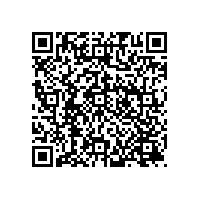
New QR Code Creator at QRickit.com
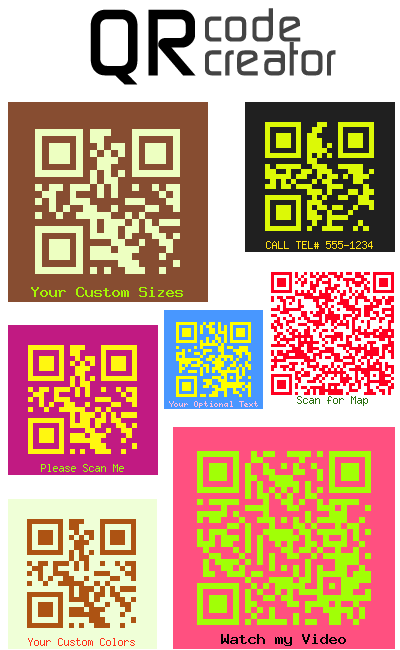
NEW! Now make your own QR Codes with custom data, colors, sizes, and footer text. Print, share or download standard gif, jpeg, png or high-res 300 dpi image files. Go to QRickit.com and use the QR Code Creator. It's quick, easy and totally free! See samples below (try scanning them...)

QRickit
Get your own QRickit at QRickit.com!
Feb 4, 2011
QRickit - Dreaming in Stereo T-Shirt
Check out the band Dreaming in Stereo. Their t-shirts are both a fashion statement and marketing tool. They are performing at SXSW next month in Austin, Texas.

Click here to get your own custom design QRickit t-shirts.
QRickit
Get your own QRickit at QRickit.com!

Click here to get your own custom design QRickit t-shirts.
QRickit
Get your own QRickit at QRickit.com!
QRickit Invasion in Austin, Texas!
QRickits will soon be invading Austin, Texas next month.
Read article at Evolver.fm on what's happening at SXSW.
QRickit
Get your own QRickit at QRickit.com!
Read article at Evolver.fm on what's happening at SXSW.
QRickit
Get your own QRickit at QRickit.com!
Jan 22, 2011
Tracking QR Codes (Campaigns) & Mobile Tagging Analytics / Stats
- How can I find out how many times my QR Code was used?
- I want to display my QR Code in multiple places, such as a website, business card, magazine ad, newspaper ad, billboard, flyer, etc. and I want to know which one is being used the most (and other stats)?
-I want to set up and track QR Code campaigns. How do I do that?
QUICK & EASY SOLUTION: Get a Google Short URL with free statistics (URL tracking). Then use the Google short URL to create your QRickit QR Code. Google gives you a link to a page where you can view basic stats for the short URL (a "click" means someone scanned your QR Code and went to the short URL). If you wish to track the same QR Code displayed in several places, you can get multiple Google short URL's that point to the same long URL (i.e. get one Google short URL for the QR Code on your flyer, another one for your magazine ad, another one for your business card, and so on).
ADVANCED SOLUTION: Similar to above, but instead of using Google short URL's, use both Google Analytics and Google URL Builder to tag your links and track campaigns. A Google Analytics account is required for this. (click here to learn about tagging links)
*In effect, you are tracking the QR Code by tracking the landing page (or URL) associated with the QR Code.
Example: How to use multiple QR Codes, Google URL Builder and Google Analytics to track QR Codes (campaigns).

- I want to display my QR Code in multiple places, such as a website, business card, magazine ad, newspaper ad, billboard, flyer, etc. and I want to know which one is being used the most (and other stats)?
-I want to set up and track QR Code campaigns. How do I do that?
QUICK & EASY SOLUTION: Get a Google Short URL with free statistics (URL tracking). Then use the Google short URL to create your QRickit QR Code. Google gives you a link to a page where you can view basic stats for the short URL (a "click" means someone scanned your QR Code and went to the short URL). If you wish to track the same QR Code displayed in several places, you can get multiple Google short URL's that point to the same long URL (i.e. get one Google short URL for the QR Code on your flyer, another one for your magazine ad, another one for your business card, and so on).
ADVANCED SOLUTION: Similar to above, but instead of using Google short URL's, use both Google Analytics and Google URL Builder to tag your links and track campaigns. A Google Analytics account is required for this. (click here to learn about tagging links)
*In effect, you are tracking the QR Code by tracking the landing page (or URL) associated with the QR Code.
Example: How to use multiple QR Codes, Google URL Builder and Google Analytics to track QR Codes (campaigns).
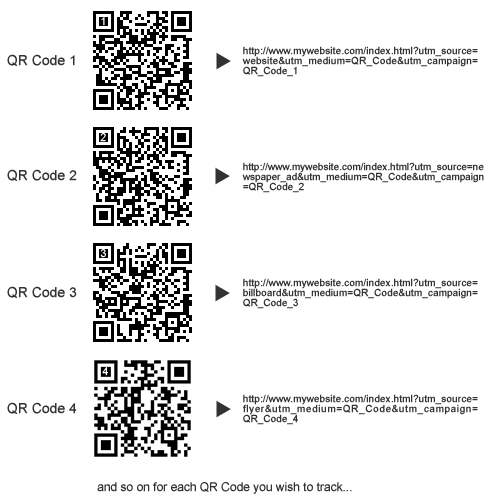
The QR Codes in the image above each direct users to a unique URL. The URL's can be made using a free URL shortening service or Google URL Builder. (Google URL Builder was used for this example.)
QR Code 1 can be displayed on your website.
QR Code 2 can be displayed on your newspaper ad.
QR Code 3 can be displayed on your billboard.
QR Code 4 can be displayed on your flyer.
To track the QR Codes (campaigns), we can track its related URL. Google Analytics can tell you the type of mobile phone used, the mobile carrier, the city/region, and other stats for each URL (campaign) associated with the QR Code.
*Tip: Since you can't really tell what data a QR Code holds unless you scan it with your mobile phone, you can print a reference number or label near or on the QR Code when using multiple QR Codes so you don't mix them up. (*The QRickit QR Code Widget here or the QR Code Creators at QRickit.com allow you to enter a label, reference number or any text in the footer of the QR Code image.)
Jan 4, 2011
Making Mobile Content
Nowadays, almost anyone can make mobile content. This can be as simple as posting an image (i.e. coupon) online. Your QRickit can direct smartphone users to the URL of the image.
A mobile site is basically a "lite" version web site with small images, brief text and links in a simple layout to fit the smaller screen size and browser limitations of smartphones.
So anyone with basic web and graphic design skills can make a mobile site and content. If you don't have these skills you can use the services provided by Google Places to create a free business mobile site with coupons or BigCommerce to create a mobile (and web) shop to sell your products. If you don't have the time or skills and wish to outsource this work, there are plenty of web and graphic designers eager to work with you. If contacting a designer for outsourcing, make sure they know about QRickit.
QRickit
A mobile site is basically a "lite" version web site with small images, brief text and links in a simple layout to fit the smaller screen size and browser limitations of smartphones.
So anyone with basic web and graphic design skills can make a mobile site and content. If you don't have these skills you can use the services provided by Google Places to create a free business mobile site with coupons or BigCommerce to create a mobile (and web) shop to sell your products. If you don't have the time or skills and wish to outsource this work, there are plenty of web and graphic designers eager to work with you. If contacting a designer for outsourcing, make sure they know about QRickit.
QRickit
QRickit for Printing & Design Professionals
Thank you to all my friends in the fields of printing and design who are helping to spread the word about QRickits.
Some of you need to generate your own hi-res images of QR Codes, and many of them. Here is a link to a software to help you do this: Barcode Studio - Barcode Maker
QRickit
Some of you need to generate your own hi-res images of QR Codes, and many of them. Here is a link to a software to help you do this: Barcode Studio - Barcode Maker
QRickit
New Year's Resolution - Adopt a QRickit in 2011
Happy New Year to Everyone!
2010 was a good year. I met a lot of people around the world and made many friends.
Glad to see companies like Best Buy and Future Shop starting to use QR Codes in their weekly flyers.
2010 was a good year. I met a lot of people around the world and made many friends.
Glad to see companies like Best Buy and Future Shop starting to use QR Codes in their weekly flyers.
I am hoping you will see more of me in 2011.
Your little friend,
QRickit
Nov 10, 2010
Canada, here I come!
CBC TV just ran a story about how QR Codes are starting to become more popular in Canada.
Click here for CBC News Story or scan me below to read article on your phone

I am so excited to be on Canadian TV!
I'm looking forward to making everyone's lives a little easier. See you Canada...
From your little friend, QRickit
Create, save and print your own QR Code (a.k.a. QRickit) for free at QRickit.com
Click here for CBC News Story or scan me below to read article on your phone

I am so excited to be on Canadian TV!
I'm looking forward to making everyone's lives a little easier. See you Canada...

From your little friend, QRickit
Create, save and print your own QR Code (a.k.a. QRickit) for free at QRickit.com
May 29, 2010
Red Bull & QRickit
Custom designed QRickit on Red Bull can.

Yes, you can brand your QR Code!
For custom QR Code, just ask me.
From your little friend, QRickit
Create, save and print your own QR Code (a.k.a. QRickit) for free at QRickit.com

Yes, you can brand your QR Code!
For custom QR Code, just ask me.
From your little friend, QRickit
Create, save and print your own QR Code (a.k.a. QRickit) for free at QRickit.com
May 27, 2010
May 6, 2010
Free breadsticks anyone?
Don't forget to print your QRickit on all your flyers!

Does your graphic designer or printing company need a hi-res image file for your QR Code? Go to QRickit.com and ask for a 300dpi, 600dpi or 1200dpi format for professional printing.
Try the new QRickit FLYER + QR CODE CREATOR to create your own QR Code and instantly print flyers, signs and posters using your own printer and letter or A4 size paper.

Design and print your QRickit on t-shirts, sweats, hats, bags, cups, and more at QRickit.com.
QRickit
Get your own QRickit at QRickit.com!
May 2, 2010
QRickit loves all kinds of music!
The UK indie band, Steranko, displays a QRickit in one of its websites. When you scan it, you go directly to their iTunes mobile page where you can buy and download their music to your phone or other hand-held device. It works best with iPhone, iPad, iPod Touch and other devices that are compatible with iTunes and have a built-in camera and QR Code reader app installed.

See how other bands from around the world are using QRickits to make it "Big in Japan" at Top Music Japan. (English Info for TopMusic.jp)
QRickit
Get your own QRickit at QRickit.com!

See how other bands from around the world are using QRickits to make it "Big in Japan" at Top Music Japan. (English Info for TopMusic.jp)
QRickit
Get your own QRickit at QRickit.com!
May 1, 2010
Say cheese!
There's a QRickit on this box of cheese. Scan it with your mobile phone and get an original Pingu backpack (3000 people) or towel present (6000 people). Wow, that's a lot of cheese!


QRickit
Get your own QRickit at QRickit.com!


QRickit
Get your own QRickit at QRickit.com!
Subscribe to:
Posts (Atom)
About QRickit
- QRickit
- I am a small, square barcode. You can find me almost everywhere. When you scan me with your mobile phone's camera I can help you do many things. Get your free QRickit below!